Micromelon Robotics
Platform
Resources
NewsAbout UsDownload
Support
Build Your Kit

Stay in the loop

New activities, teaching guides, and product updates delivered to your inbox.

Micromelon Robotics

Australian-made educational robotics for the next generation of innovators.

contact@micromelon.com.au

Company

  • About Us
  • Privacy Policy
  • Terms and Conditions

Products

  • Micromelon Rover
  • Code Editor
  • Robot Simulator
  • Junior
  • Python Library

Support

  • Resources
  • News
  • Rover Repairs
  • Contact
  • Build Your Kit

© 2026 Micromelon Robotics Pty Ltd. All rights reserved.

ABN 56 623 302 296

← Back to Resources
ActivitiesIntermediate

Activity: Wind-up Rover

Coding Skills

IterationVariablesMaths

Rover Concepts

AccelerometerMotors
Activity: Wind-up Rover

Create a classic wind-up toy out of the Rover. The Rover records the number of seconds it’s held upside down, and when placed right way up it will move forward. The longer it was held upside down, the longer and faster it will move. For more interesting wind-up Rovers, incorporate the LEDs and buzzer to respond to the wind-up time.

Activity Demonstration: Wind-up Rover

Setup

The only requirement is a long enough space for the Rover to move in. If you have limited space, add a cap to the wind-up time.

Our Approach

Stage 1: Set Up the Wind-up Variable

Create a variable for the wind-up time, then a While True loop so the wind-up and unwind code repeats. Inside the loop, add an IF statement that checks whether the Rover is upside down.

Stage 2: Wind Up When Upside Down

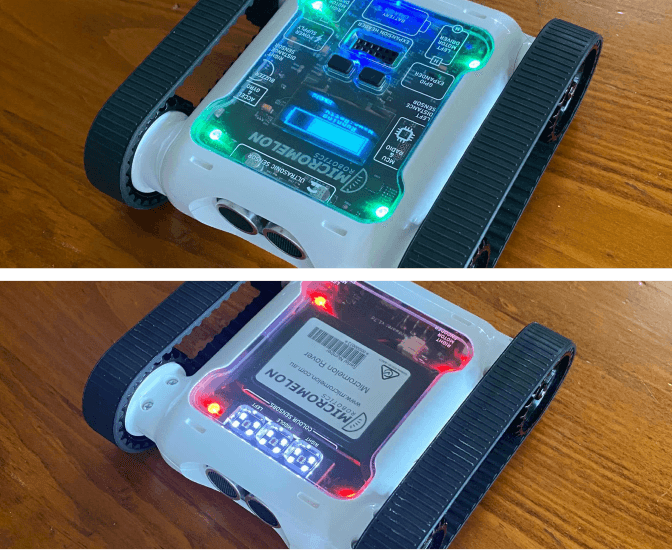
When the Rover is upside down, set all LEDs red and begin increasing the wind-up time. Add 1 to the variable and delay for 1 second, this means the wind-up time increases by 1 each second.

Stage 3: Unwind When Right Way Up

When the Rover is right way up and the wind-up time is greater than zero, enter the unwinding branch. Set the LEDs green, then run your sound and motor commands (feel free to be creative here). Decrease the wind-up time by 1 and delay. Once it reaches 0, enter the ELSE branch and turn everything off.

Example code, wind-up Rover with accelerometer-driven state machine
Example code, wind-up Rover with accelerometer-driven state machine
Continue Learning

Activity: Balance BotRelated resourceActivity: Balance BotLearn iteration, algorithm design, maths, and how to use the Rover’s accelerometer and motors.

Activity: Flip BotRelated resourceActivity: Flip BotLearn branching, iteration, and how to use the accelerometer.

The AccelerometerRelated resourceThe AccelerometerLearn what the accelerometer is, how it works, and how to code it on the Micromelon Rover.

← Return to Resources