This post is a taster on how 3D printers work, where they don’t work, and how they can be used in the classroom. It’s the written version of a Professional Development webinar Micromelon Robotics ran for teachers in 2022. Check out the events page for upcoming sessions.
How Do 3D Printers Work?
FDM 3D printer laying down filament layer by layer
The term “3D printing” covers several different technologies, each with their own benefits and drawbacks. We’ll mainly be discussing the most accessible and affordable kind: FDM (Fused Deposition Modelling). Resin LCD printers are also becoming a mainstay among hobbyists and schools thanks to falling prices and improving quality.
FDM printers use spools of plastic, “filament”, which are melted down and laid out layer by layer on a usually heated bed. You can think of this like a traditional printer where each layer is a single page of paper, and the ink is the filament. Layer height varies based on nozzle size and printer settings, often less than a millimetre. This is also where 3D printing’s biggest weakness shows up, at 0.2 mm layer height, a 1 cm tall object takes 50 layers to finish.
Where Is the Technology Currently?
3D printing has come a long way, from crudely assembled printers in people’s garages to almost fully assembled machines for sale at your local electronics store. Prices have come down and there’s been a relative plateau in features, with most focus on being usable out of the box.
There are roughly two FDM price tiers:
- Under $800: usually forgo some of the more “premium” features and support to meet this price point. Great for someone with the time and knowledge to tinker, but not great “workhorse” printers; they require maintenance and break more quickly.
- Over $800: usually come with quality-of-life features like automatic bed levelling, filament-out detection, and pause-on-out-of-filament. Easier to use day-to-day, less maintenance, and more printing.
3D Printer Materials and When to Use Them
Filament is the “ink” for an FDM printer. It comes in many different types, each with its own mechanical properties. Some prominent newer types: PETG (more heat-resistant and durable than PLA), and ASA (similar to ABS but better against UV). Composite filaments are also becoming more common, embedding carbon fibres or glass to improve strength.
PLA
PLA is one of the most-used materials by hobbyist 3D printers. It’s easy to print, requires low hot-end temperatures, has a low tendency to warp, and produces good details. PLA is also among the cheapest filaments. The main downsides are that it’s susceptible to temperatures near and above ~60 °C and is brittle compared to other materials. We at Micromelon use PLA whenever we need to prototype a design or print Rover attachments, it’s just easier to print with.
PETG
PETG has several benefits over PLA. It’s only slightly more expensive while still being relatively easy to print with, low warp tendency and similar hot-end temperatures. It produces tougher and more durable parts and tolerates up to ~80 °C. Downsides: it’s prone to leaving thin wisps of filament, struggles with unsupported bridging, and can lose detail on complex parts. Layer adhesion is so strong that supports can be much harder to remove than PLA.
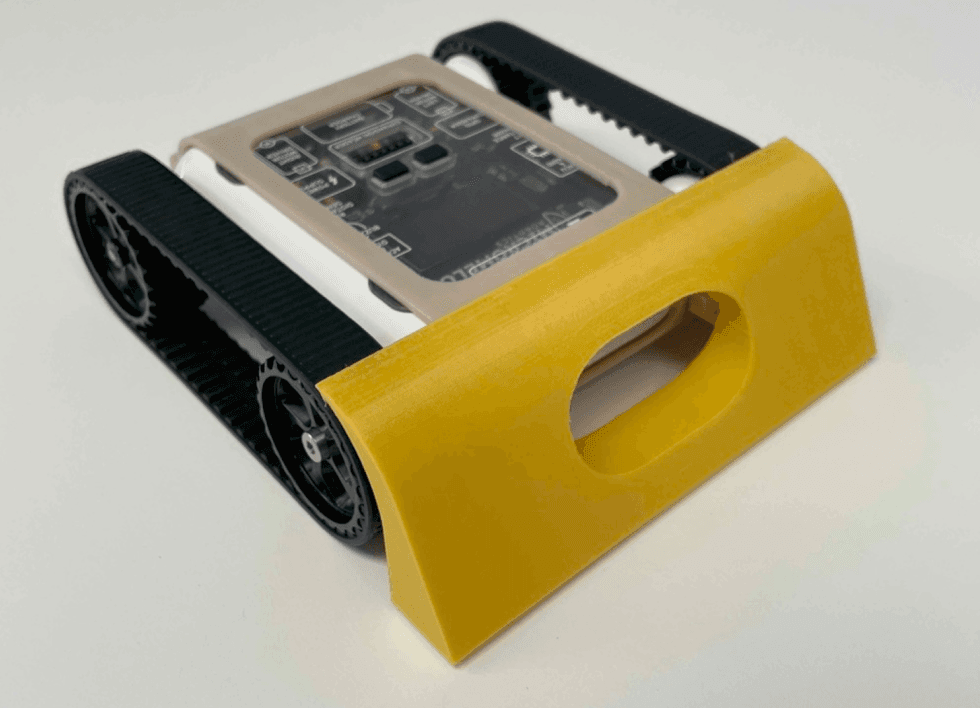
Use PETG when forces on the part are higher (wall hooks, shelf brackets) or for robotics applications like sumo shields and the attachment spider clip.
ABS
ABS is plastic used worldwide in injection moulding and was one of the first materials used in 3D printing. It has significant mechanical resistance and tolerates up to ~100 °C. It can be post-processed with acetone smoothing for a glossy finish. Downsides: requires significantly higher hot-end temperatures, needs an enclosed printing chamber to avoid warping, and gives off dangerous styrene fumes.
Generally avoid ABS in classrooms because of the fumes; it might be necessary if a part will be exposed to long periods of sun.
ASA
ASA is similar to ABS but more UV-resistant, while keeping most of its mechanical properties. It also warps less and produces fewer dangerous fumes, though still some. ASA is more expensive than ABS. It’s a good successor to ABS for technical parts exposed to high stress and temperature, indoors or outdoors.
Flexible Materials
“Flexible Materials” covers multiple filament types characterised by their flexibility. They have excellent layer adhesion, can withstand significant mechanical forces without permanently deforming, and resist wear well. They’re also dimensionally accurate due to low shrinkage. Downsides: they’re tough to print, require significantly slower print speeds, are bad at bridging, and are highly hygroscopic (they absorb water from the air, making things worse).
We don’t regularly use this material at Micromelon, but it’s invaluable when an object needs to bend or compress.
Composite Materials
“Composite Materials” combine a base polymer (PLA, PETG) with a filler like carbon fibre or glass powder. The result has improved mechanical properties such as toughness. The material takes on the printing properties of the base polymer, with added downsides: highly abrasive fillers wear down standard brass nozzles quickly and cause clogs, so a hardened-steel nozzle is recommended (more expensive, requires retuning). Reduced layer adhesion is also common.
Excellent mechanical properties, useful in things like drone frames.
How to Take Your Ideas to the 3D Printer
The biggest advantage 3D printing gives us is quickly going from concept to reality, “rapid prototyping”. It replaces the need to make something using hand tools or other large, expensive, difficult-to-use machines. Anyone can take a design, print it, evaluate it, and tweak it in real time. This is cheap, effective, and instils a vital part of the engineering process in the designer.
The process can be broken down into three parts: Designing, Slicing, and Printing.

The design → slice → print workflow
For students, we often need to repeat this cycle a few times. To save class time, filament, and failed designs, we normally start with ideation and sketching, following the engineering design process: lots of thinking and sketching first, then jumping into software, then printing and evaluating where we went wrong.

The engineering design process
3D Modelling and Design
Once your idea is fleshed out, design it in CAD software like Tinkercad or Fusion 360. Keep the physical limitations of your printer in mind, overly large or complex parts will cause difficulties down the line. Some rules of thumb:
Rule: Keep a flat portion on the part to help with orientation on the printer
A spinning top with no flat portion on the bottom is impossible to print as-is. Adding a flat handle on top means the spinning top can be placed upside down and printed with support.
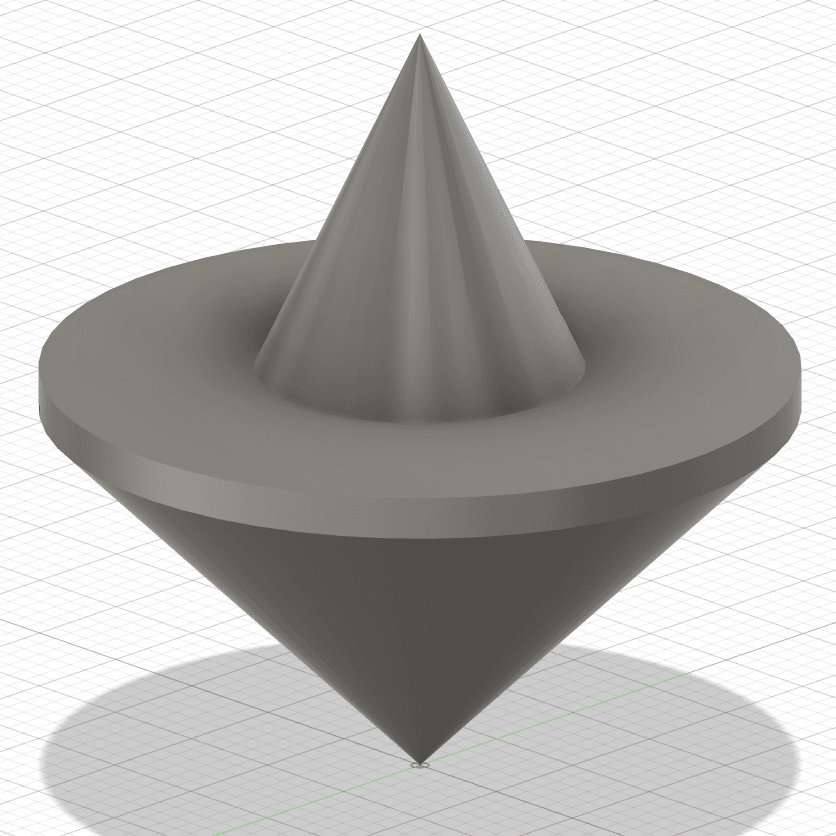
No flat surface
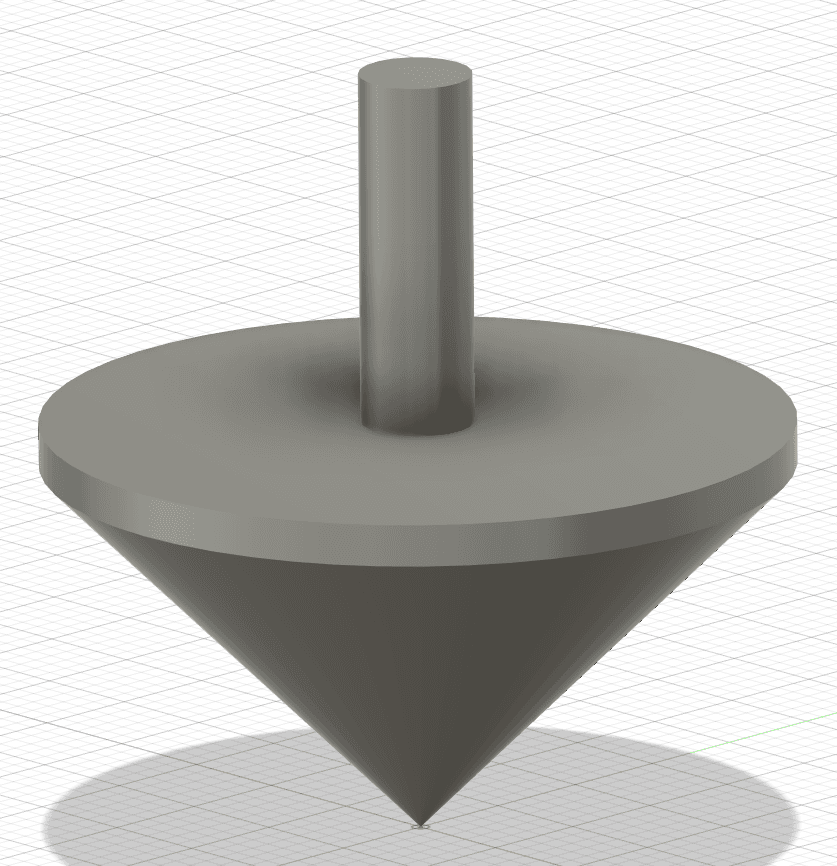
Flat surface added
Rule: Minimise features that aren’t directly connected to something below
A bracket with overhanging portions on each side requires support material between the bottom and top surfaces, challenging to remove and leaves a bad finish. Filling in the overhanging portions makes it significantly easier to print.
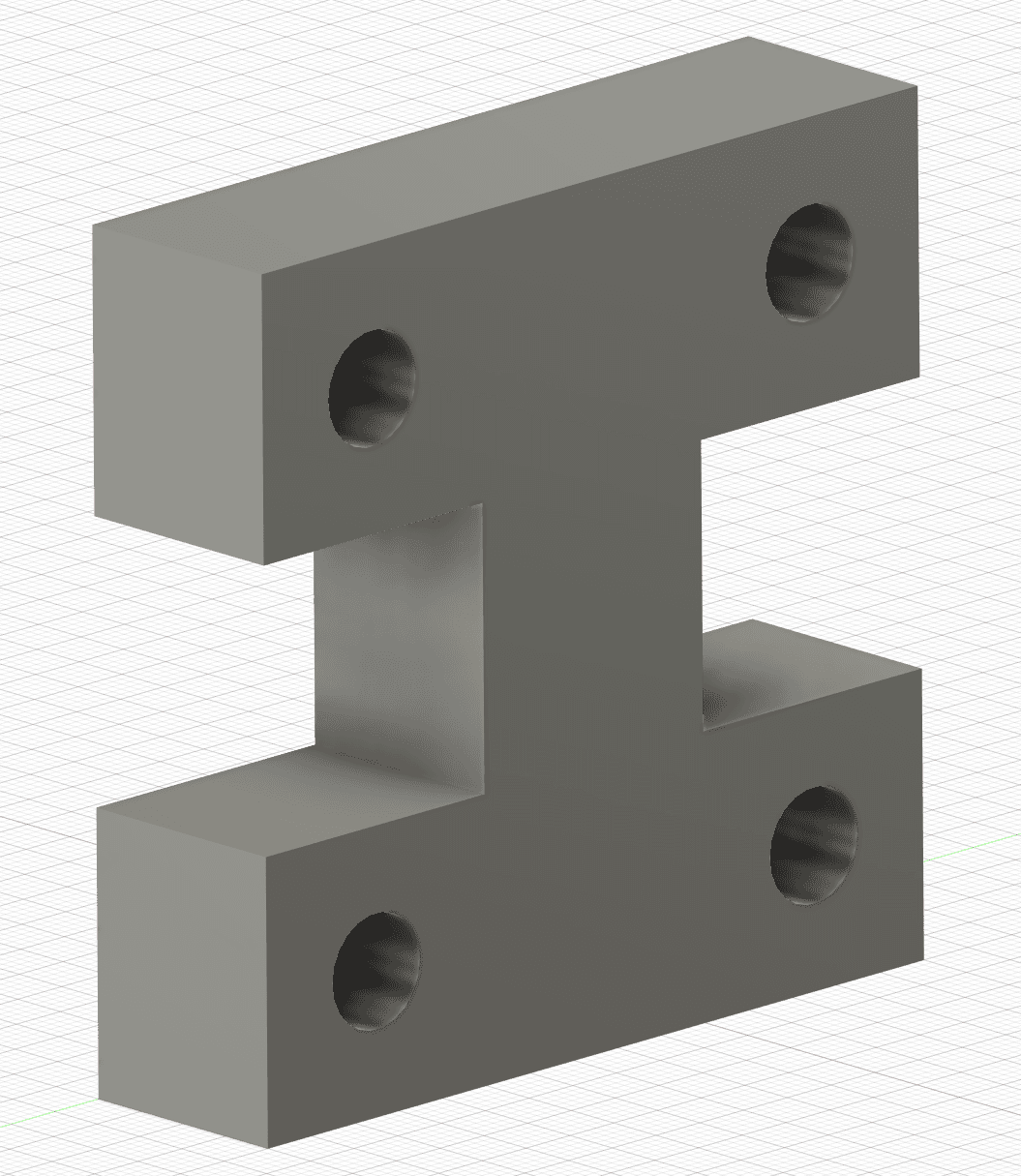
Overhanging portions
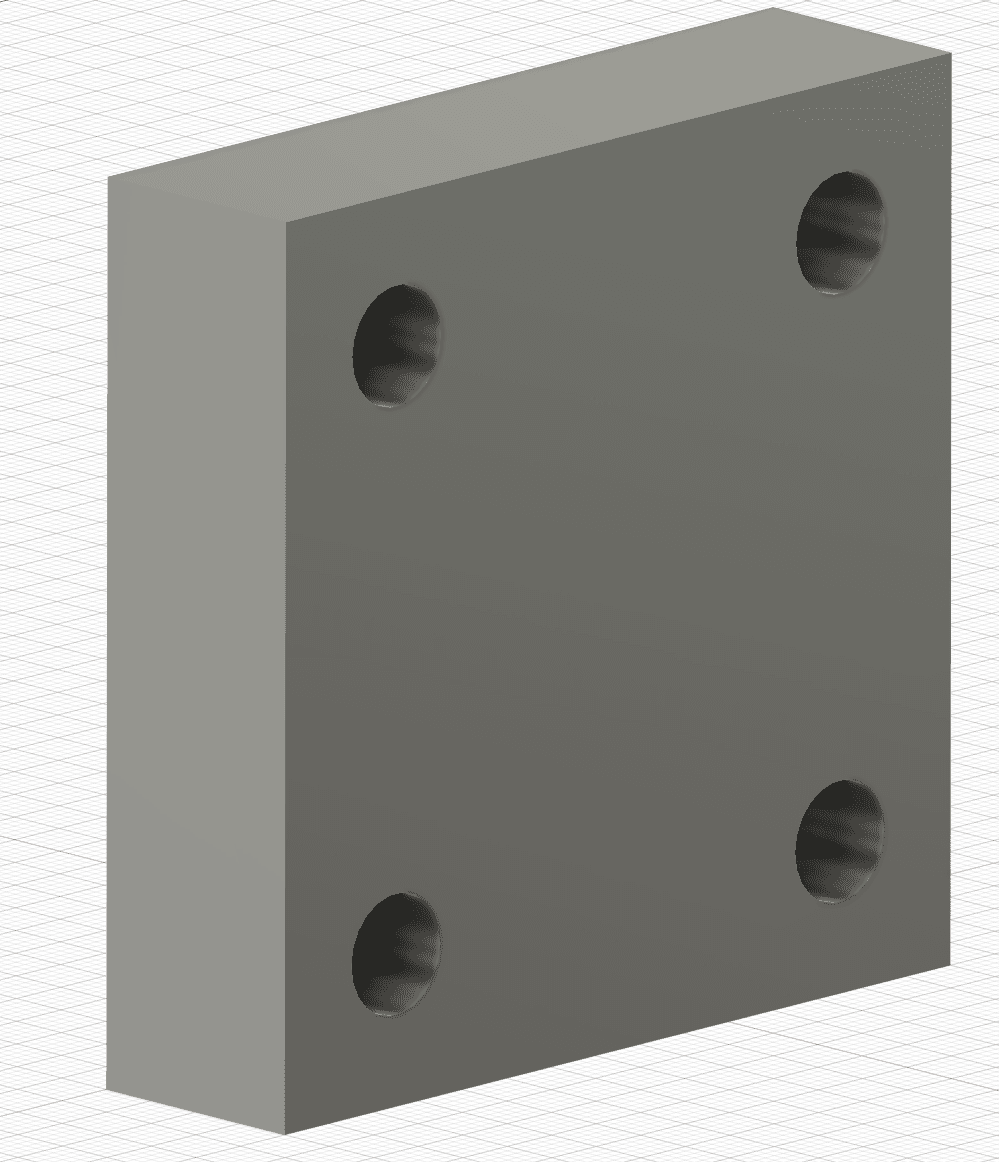
Portions filled in
Rule: If something must stick out, keep it at an angle of more than 45° to avoid supports
A stopper meant to hold an O-ring between two ridges would otherwise need supports between the surfaces, leading to a reduced finish that could damage the O-ring. Adding a 45° angle on top means the stopper can be printed without supports.
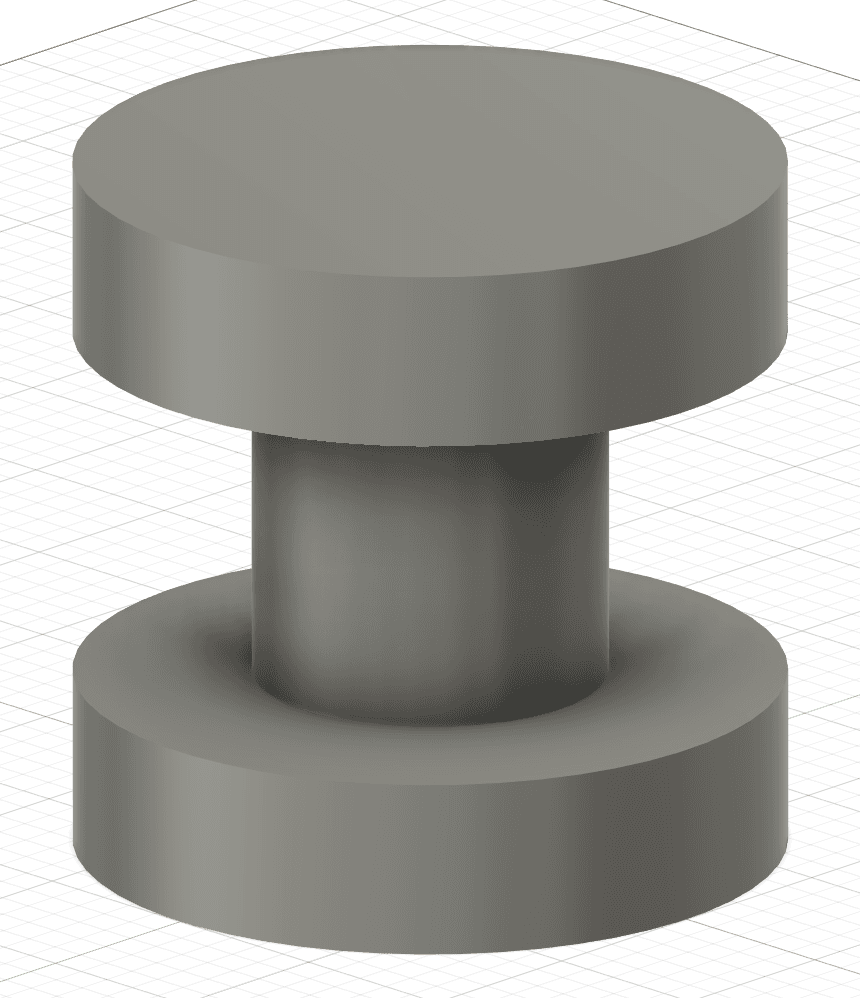
Needs supports
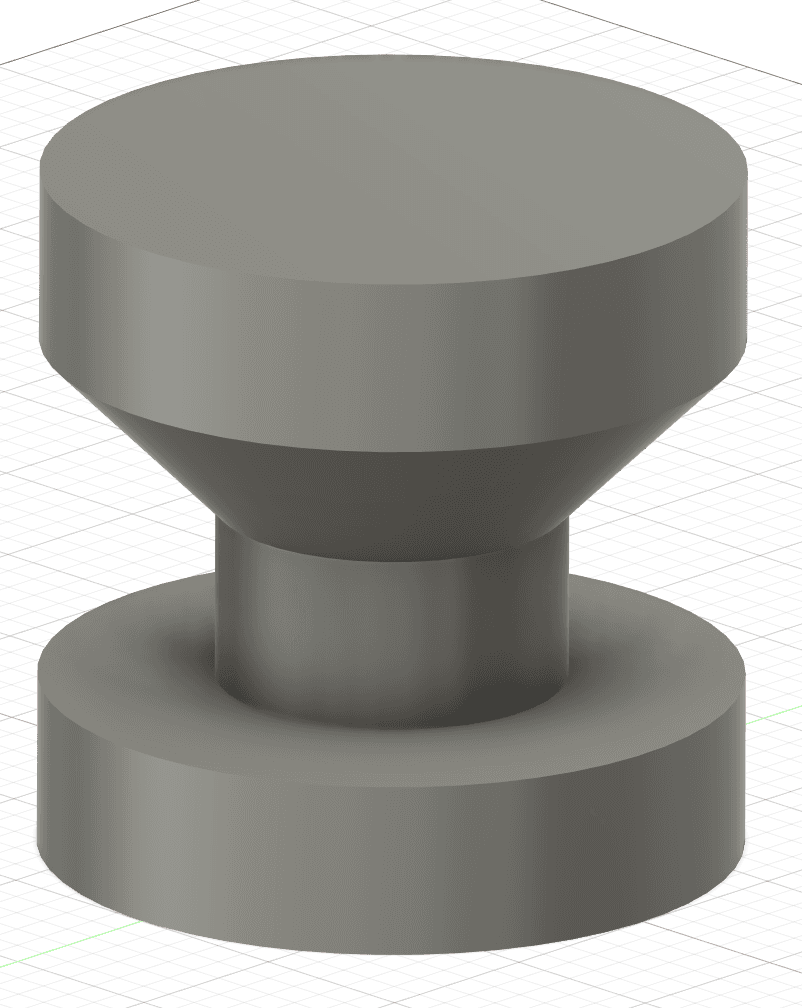
45° angle, no supports needed
Rule: Curves look best oriented along the X and Y axes
Because 3D printers slice models into layers, a curve oriented on the Z axis ends up made of stacked layers and looks like steps. Orient significant curves along the X or Y axis instead, the resolution there is significantly better than the layer height.
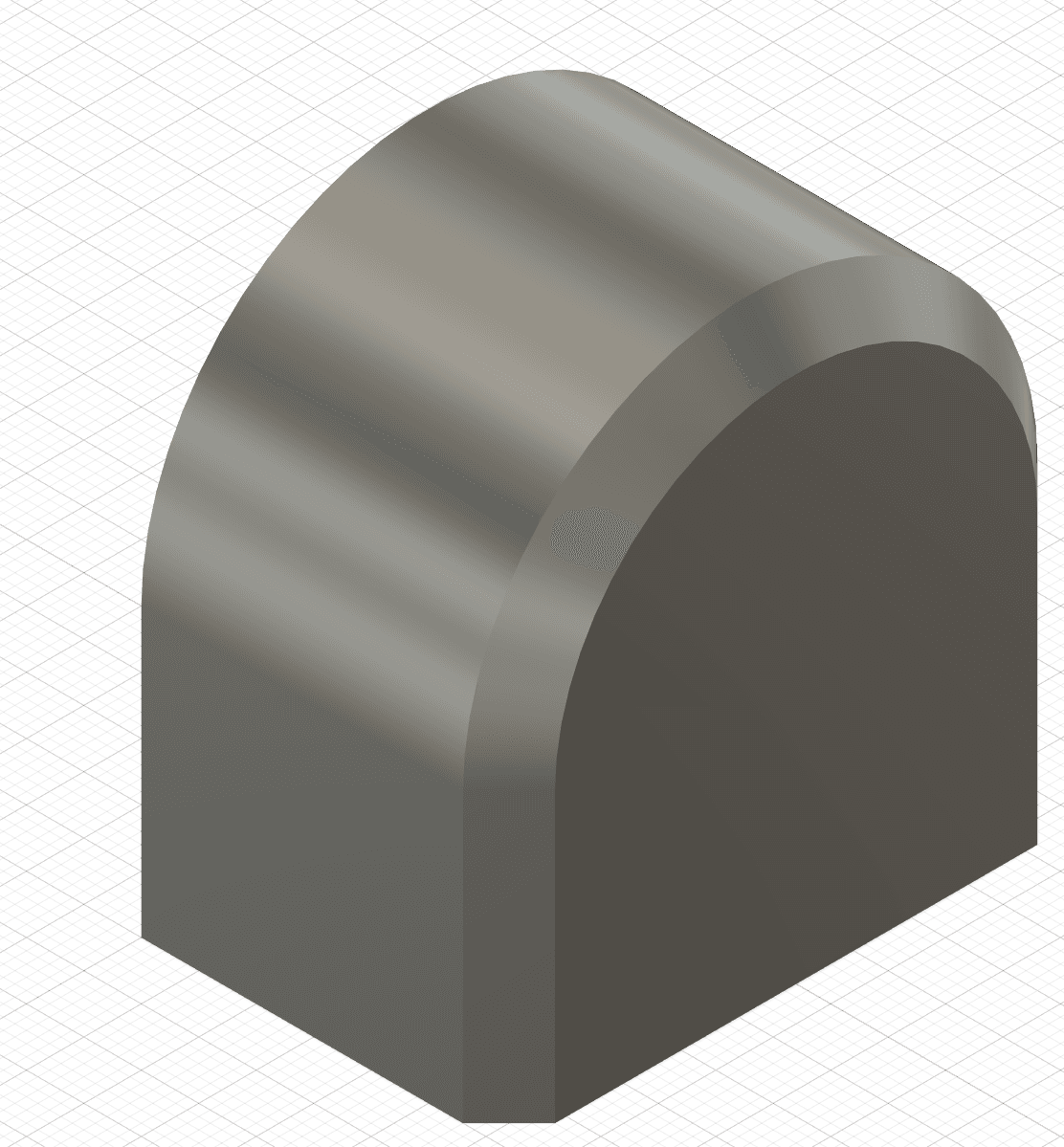
Curve on Z-axis (stepped)
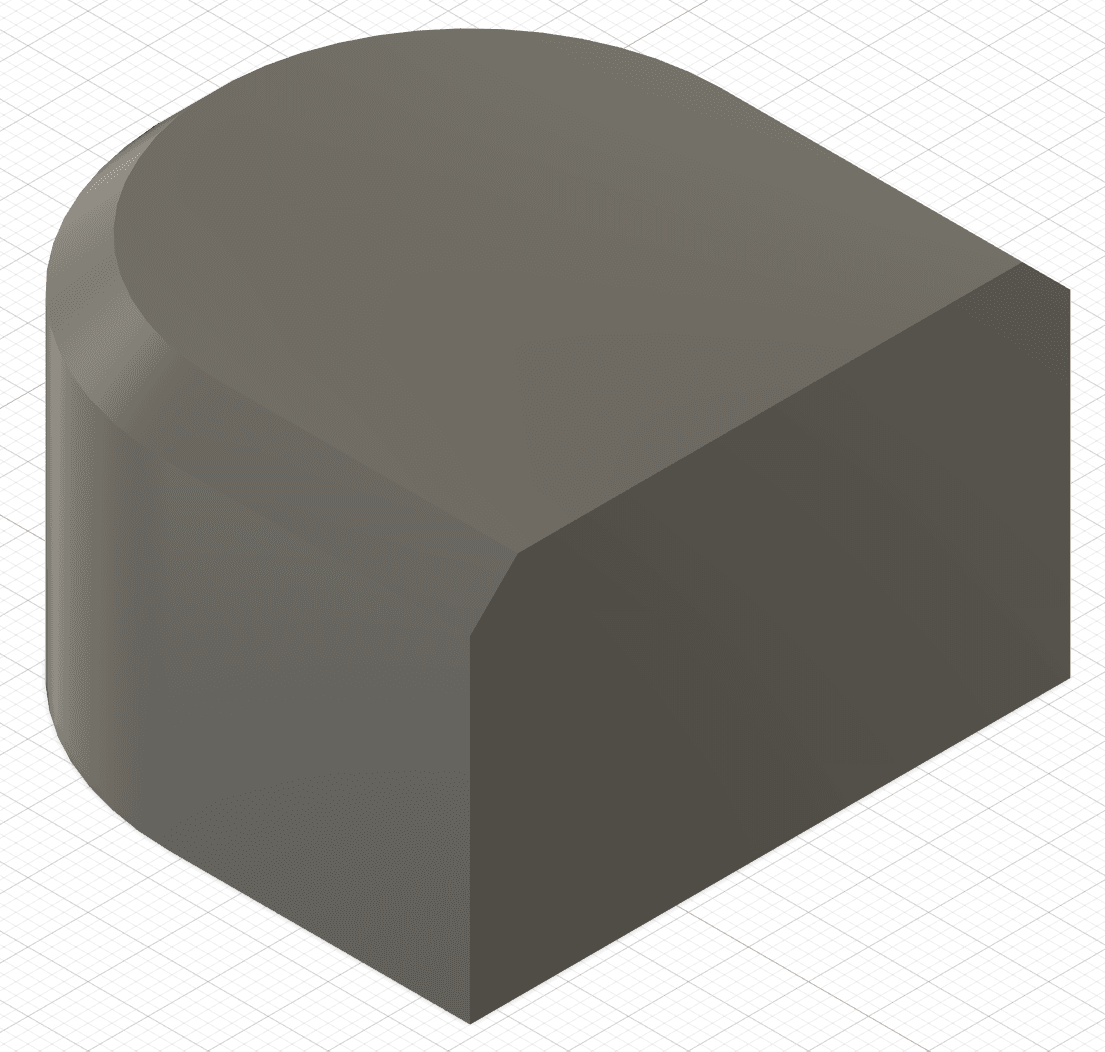
Curve on X/Y-axis (smooth)
Slicing
A slicer (Cura, Prusa Slicer, etc.) takes your design and translates it into something the printer can understand by “slicing” it into layers based on your printer’s physical characteristics and your software settings. This is where you consider supports, orientation, print times, and so on. Your printer’s brand will determine which slicer you can use, we recommend the manufacturer’s version for best results. The model name is usually on a sticker on the printer; if you can’t find a slicer for your printer, reach out and we can help.
Printing
Take your sliced design to the printer. Some printers print directly from USB; others use SD cards; more advanced machines accept files over Wi-Fi. The printer starts as soon as the file has been uploaded and selected. Follow your printer’s user instructions, sometimes they’re right on the front of the machine.
Where Things Go Wrong
Although 3D printers are fantastic, they’re still complex pieces of technology with plenty of failure modes.

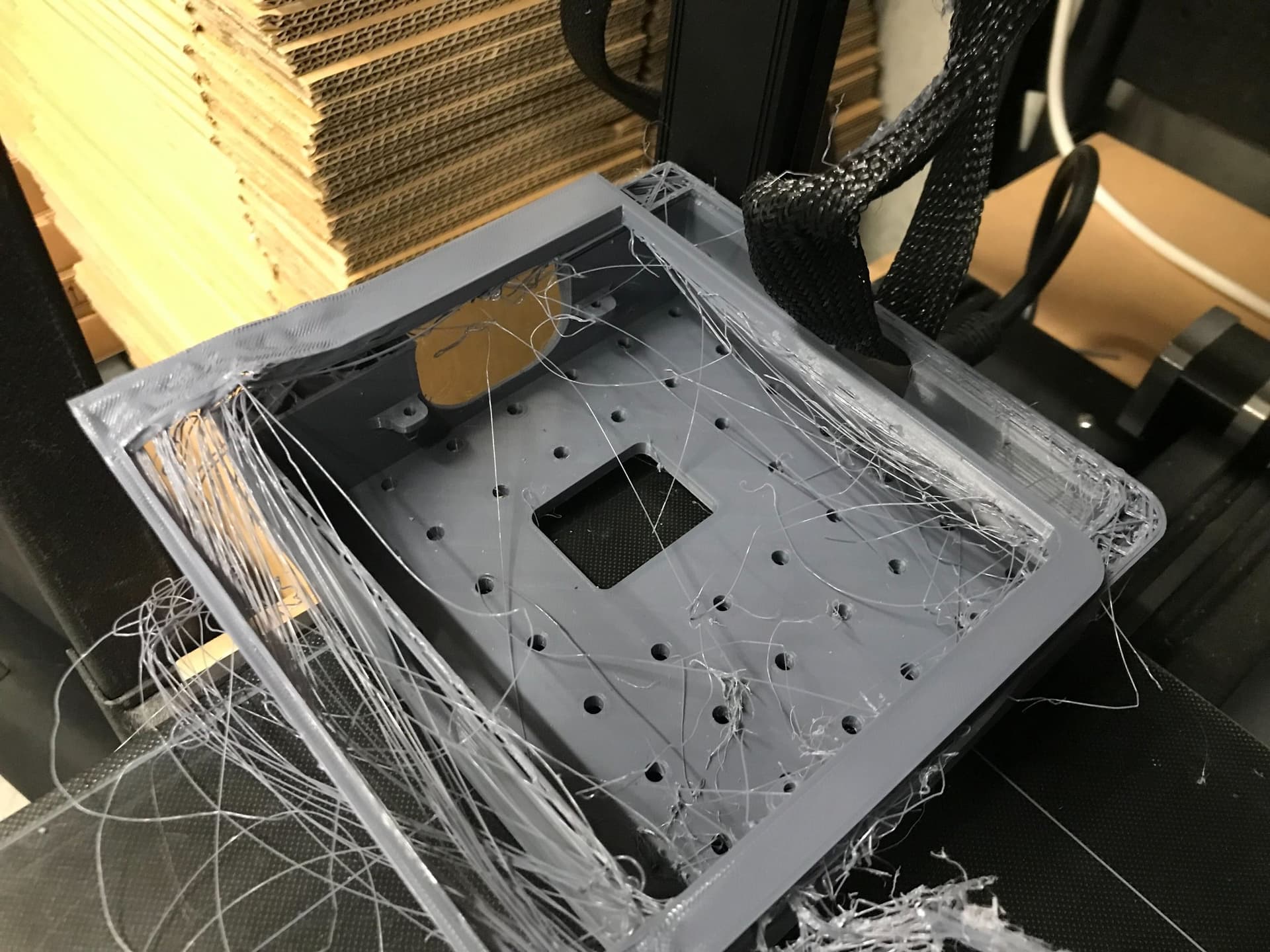
A failed print, the dreaded ‘spaghetti monster’ (Image: Prusa Research a.s.)
No matter how well-tuned your printer is, an impossible-to-print model will fail. This is where the rules of thumb come into play, minimising potential issues early in the design process saves a lot of heartache later. 3D printers are complex, but they only do what we tell them. Ask them to print in thin air and they’ll attempt it, leaving filament covering the bed in strands of spaghetti.
Printers also need regular maintenance, anything from cleaning the print surface so filament will stick, to tightening loose belts. All filaments are hygroscopic to some extent, so they absorb moisture over time, which can heavily affect prints.
A note on storing filament: we have a blog post coming soon on this, keep an eye out.
Support Material and Printing Complex Parts
Support material is a staple of 3D printing, temporary structures the slicer adds so you can print on top of them. This lets you print much more complicated shapes that would otherwise require printing in mid-air. Supports come at the cost of additional filament use, longer print times, and additional post-processing to remove.
Depending on your printer, you may be restricted to using the same material for both your object and the supports. The upside is better adhesion between supports and object, your prints are more likely to succeed. The downside is more effort to remove the supports and a reduced surface finish. Material choice matters: PLA supports are easier to remove than PETG (which has stronger layer adhesion).
If your printer supports multiple materials via multiple extruders, you can use different materials for supports, providing quick and clean support removal, but increasing print times. This is typically restricted to more expensive printers.
Supports are a double-edged sword. On one hand, you can print whatever you want; on the other, you’re dealing with extensive post-processing, longer print times, and a diminished surface finish.

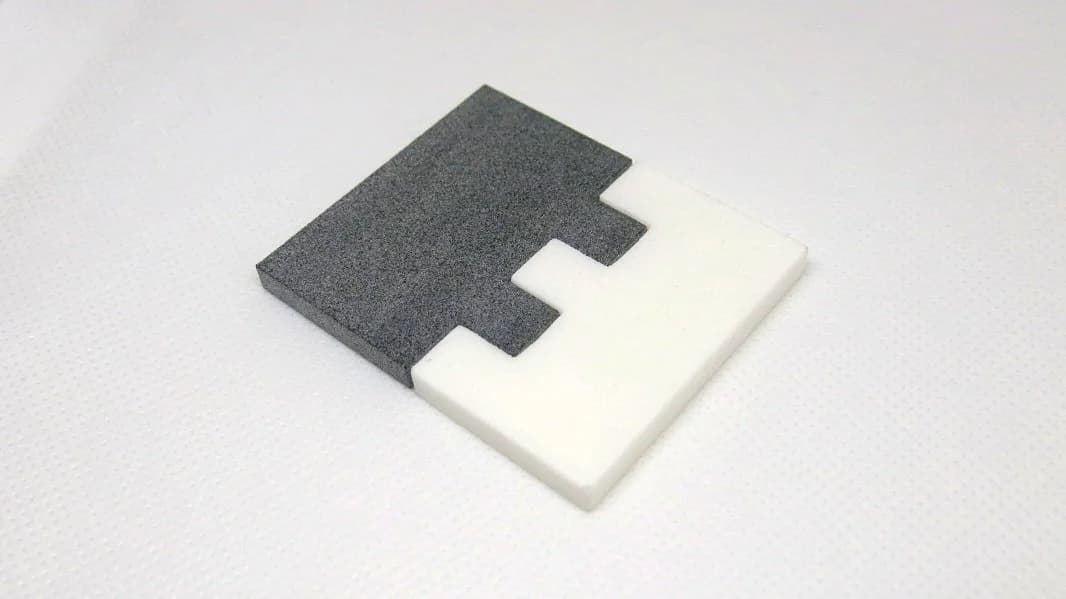
Support material removal, finished part on the left, supports on the right
3D Printing in Industry
3D printers have been highly influential in how engineers work worldwide. Gone are the days when complex prototypes had to be sent off and manufactured over days or weeks. Industrial designers and engineers can design, analyse, and refine quicker than ever, parts can be printed in-house, evaluated, and iterated without external partners. Even things as simple as a TV remote can be printed, held in hand, and changed within the same workday.

Industrial designers prototyping with FDM printers
Here at Micromelon, we’ve been using 3D printers to prototype our robots since 2017, and before that on uni projects and other companies’ products. 3D printing let us sell our first products, refine our designs, and upgrade parts based on direct customer feedback, all before we were ready to order thousands of Rover shells at a time.

Early Micromelon prototype prints
A great example taken to extremes is NASA. In 2014, NASA sent the first 3D printer, the ReFabricator, to the International Space Station, an FDM printer using very similar technology to what’s in classrooms today. It enabled designers on Earth to design tools and parts that could be printed in space and used immediately. It was also the first 3D printer to break down old prints and reuse the material to create new parts.

NASA’s ReFabricator on the ISS
Finally, 3D printers have enabled entire businesses based on customisation. Whether it’s someone adding a cup holder to their own car or creating custom cup holders for a whole range of vehicles, 3D printing has given people the ability to customise anything. You can design a part, print a few, sell them, and still have it be worthwhile. Etsy and other marketplaces are full of this. If the thing you need doesn’t exist, thousands of people who 3D model and print for a living are willing to design a part just for you.
Wrapping Up
That’s a crash course on 3D printing. There’s plenty we purposely didn’t include, this could honestly be a whole book. Things like which 3D printers are best for classrooms, where to download models from, how to store filament, and how to manage 30 students all wanting to print their new design at once are all great questions, and ones that are best handled in a video call with our 3D printing experts. Feel free to reach out, we’re happy to support you on your 3D printing journey.
Get in TouchSend us a message and we will get back to you within 1 business day.